Showing posts with label SEO Updates. Show all posts

Saturday, 19 November 2011

How To Analyze Your Content Performance In Google Analytics

Google Analytics is divided in five main categories:
  1. Visitors
  2. Advertising
  3. Traffic Sources
  4. Content
  5. Conversions
In this post, I want to talk about the Content category. I will not discuss all  the reports available, but the ones I use most frequently.
If you click on Content it will expand to the sections below:

Overview

The overview gives a quick overall view of your content. You can see metrics such as pageviews, unique pageviews, avg. time on page and bounce rate. By using the date range option on the top right corner, you can select your date range and also easily compare to past dates.
In the overview you have the option to click on page, page title, search term, event category or Adsense page. You will get a summary of the report and with one click you go to the full report.

Site Content

Site content reports consist of:
  • Pages
  • Content Drilldown
  • Landing Pages
  • Exit Pages

Pages

If you want to know which pages are visited the most on your website, this is the report for you. Below a screenshot of the top bar in Google Analytics when you click on Pages. These metrics you get for every page.

You can easily change the appearance of your data by using the view option.
There are five different views. Data (this is the standard view), Percentage, Performance, Comparison and Pivot.
I really like the Comparison view, because it’s easy to compare page performance against the site average. It’s great to get quick insights about which pages are performing well above or below site average regarding metrics such as Avg. Time on page, bounce rate and % of exits.

Landing Pages

In the landing pages option, you can see which pages are the most popular landing pages for your website and their performance. You can click on every page and by choosing secondary dimension you have many options to filter.
If you e.g. want to know which traffic sources are bringing the most traffic to your homepage, just click on the homepage and select source. (see screenshot)
Great thing about this report is that E-commerce data is included, so you see which pages bring you transactions and revenue.

Site Speed

In May 2011, Google announced the site speed option in the new Google Analytics interface. You can measure this by adding the line _trackPageLoadTime(); to your tracking code. Click  herefor the detailed instructions.
In this report, the average page load time of your pages is shown. Google has officially announced that site speed is a signal in their search ranking algorithms, so I definitely recommend to start measuring the speed of your pages. After all, nobody likes slow loading pages.

Site Search

If you have a search engine on your website which visitors can use to search the site, you can measure the usage of this feature. The results you can find under the Site Search category in Google Analytics.
Site Search consists of:
  •  Overview
  •  Usage
  •  Search Terms
  •  Pages

Overview

In the overview, you see the percentage of visits with and without site search. Also some other metrics such as % search exits, % search refinements, time after search and search depth.

Usage

Usage also provides you with the percentage of visits with and without site search, but you have more options to filter your data through secondary dimension. Also, you have the view option to change the appearance of your data which I mentioned earlier in this post. And there is an E-commerce tab that gives you transactions, revenue and conversion rate data.

Search Terms

This report gives you the search terms people use to search your website. It’s a great way to find out what people are searching for. This report also provides you with the metrics % search exits, % search refinements, time after search and search depth for every search term.
With this information you can analyze the top search terms. For example, you can compare the % search exits for a particular search term to site average. If it’s very high, maybe your search engine is not giving the best results for the query.

Events

If you have event tracking enabled, you will use this report to see the results of your events.
The events category consists of:
  • Overview
  • Top Events
  • Pages
With event tracking, you can measure all kinds of activity on your website such as PDF downloads, printing pages, interaction with a slidehow, watching videos and much more.
If you want to implement Event Tracking you can click here for all the details. I recommend first to decide all the things you want to track on your site using event tracking. This will help to create a clear report in Google Analytics after Event Tracking is implemented.
The Content category provides so many information about the performance of your website to keep you busy analyzing it for a long time. It’s a great place to find new insights and take action on it.

Tuesday, 15 November 2011

How To Build An Effective Content Section For Your Website


The heart of any decent website is the content that it produces and while great content will attract users that content must be displayed in a manner that allows users to enjoy and ultimately absorb it.
By properly formatting the content area of your web property you can build a website that users find enjoyable to browse on a regular basis.
Here are several tips that will help your content area stand out from the rest of your websites design, placing the focus on the most important part of your website, the content.
1. Content Area Should Dominate The Website
The content area on your website should be larger than the other combined areas of the site. For example if you feature a left sidebar that is 200px and a right sidebar that is 250px you have already capitalized on 450px of space, at which point your content area should be larger than 450px.
2. Don’t Over Enlarge Your Content Title
A popular mistake found on many websites occurs when the title for each post is over enlarged. While you want to provide your readers with a quick understanding of your article an overly large font means taking up more space which in turn pushes your actual content further down the page. I typically make a general rule of thumb that titles are highlighted with the <h1> tag and are no more than 4px-6px larger than the main content font.
3. Properly Highlighting Links
When a website owner realizes you have linked to their content they may visit your website to see how you have chosen to link into their content, for that reason it’s important that you don’t hide your external links. Some website users use light highlighting to make links hard to see, therefore making it less likely that visitors will leave their website. When optimizing links I think of them as relationship building with other webmasters, the more they see clearly defined links to their web properties the more likely they will be to link back into my own unique content. If you use Kontera, Infolinks or other contextual link programs I suggest using a different link highlight color than those advertising programs to define your own links compared to adverts.
4. Padding The Margins On Your Content
While your content area should dominate the landscape of each page on your website in terms of space occupied it’s also important that you clearly define the content area. The easiest way to define your content is to provide at least some margin space around your content and other areas. When using padding I make sure my left and right side areas are evenly spaced to create a consistent content area. For example if a left and right sidebar setup is used I will implement 5px of padding for the left side and 5 px of padding for the right side. It’s also a smart idea to pad your top and bottom areas equally. By defining your padding the user receives a consistent viewing experience.
5. Avoid crowding The Content Area With Ads and Related Links
Some well known entertainment and “how-to” websites love to crowd their content with block ads and even “related links” in the middle of paragraphs. While those sites are able to crowd their content because of reader trust it’s not a good idea when attempting to build an audience. The content area should be free of obtrusive ads and feature only the content you are attempting to deliver. If you want to use ads place them directly before or directly after your content to avoid distracting new viewers who are receiving a first impression.
Building an effective content section is simply about isolating your content, keeping it free of “ad and related links” debris and understanding that the content must always come first, if you make a clean content area that users enjoy reading you’ll be one step closer to building an effective and successful website.

    Saturday, 5 November 2011

    Bing Webmaster Tools Adds More Data, More Controls


    Starting with a very open session at SES New York earlier this year, Bing has been asking webmasters all across the country to get the skinny on what they want in their toolkits. In June, Bing released what they had codenamed their Honey Badger update to Webmaster tools. A few months later, Bing integrated Yahoo! Site Explorer data into Webmaster tools. This week, Bing released their next major set of additions to Bing Webmaster Tools.
    In an effort to help website owners improve their sites and do more on Bing, the Bing team announced a new set of expanded Webmaster Tools. Their goals are threefold: share more data with site owners, give site owners more useful tools and increase transparency in data to site owners.

    Expanded Crawl Details

    bing-wmt-crawl-details
    Errors and other information in the Crawl Details information now include all inbound link information and also includes information about malware. Any of your site's URLs that are listed under under the 400-, 500- or 300- HTTP codes detailed lists will now let you know what site linked to you that Bing followed to receive the error or redirect, including URLs listed under robots.txt and Malware headings. Previously, only the 400-level HTTP errors contained inbound link information.

    URL Normalization

    bing-wmt-url-normalization
    Bing has added URL normalization suggestions. URL normalization allows you to tell Bing which URLs in your site have query parameters. Bing also increased the number of parameters you can define from 25 to 50.

    Malware Notifications

    Bing will be expanding email alerts for issues your site may have like malware alerts. You can also choose to get email alerts for various crawl settings.

    DNS Verification

    bing-wmt-verify-ownership
    To verify ownership of your site, Webmasters can now use CNAME DNS records. Previously, verification was performed by uploading an XML file or using an HTML tag in your site's index page.

    Integrated adCenter data

    bing-wmt-adcenter-avg-cpc
    Last, but certainly not least, adCenter data will be included in Traffic Data. Bing is releasing Average CPC (cost per click) as a column in the reports.
    Speaking to Search Engine Watch, Bing's Duane Forrester pointed out these enhancements are valuable to webmasters and can help site owners find problems on their sites.
    When faced with a laundry list of 400- or 500- errors in Bing Webmaster Tools, a site owner is now empowered with information to help them determine where to start. Providing inbound links that made Bing find the error is a starting point. If you have moved content someone else links to, you can now set up redirects or other courses of action. The point is, there's a starting point for taking positive action.
    "We can see the obvious problems, [choose to] hit the red button and drop the site from the index, but that doesn't help a webmaster fix a compromise," Forrester said. "We look at this as a way to bring on the right conversation with Webmasters."
    With recent hacks to WordPress installations and other CMS systems, site owners need to be constantly vigilant. Typically, a site owner can get removed from a search index, even temporarily.
    Forrester suggests Bing sees the enhancements to Webmaster Tools as an opportunity to reach out to site owners and help them fix a compromised site. Through Webmaster Tools and email alerts, Bing helps site owners, their search index and the Web overall.
    "We're quite happy to have that conversation," Forrester said.

    Google Now Shows Ads Below Search Results


    bottom-ads-google-kittens
    Ads that were previously shown to the side of the results may in some cases appear below the search results, Google announced via Inside AdWords. Google reports that ad click-throughs are higher when the ads are integrated into the search results instead of being displayed on the side.
    Google will now be classifying the ads as "Other" in your AdWords account. These are also known as experimental impressions, but should easily seen at the bottom of the page. Google should rename this from Top vs Side to "Top vs Other" in the coming weeks as not to confuse people.
    Google has confirmed that ads will only be displayed on the side or at the bottom, at least for now. When ads appear on the right, no ads will appear on the bottom; when ads appear on the bottom, no ads will appear on the right.
    Will this will work out for advertisers in the long run? I’ve found that 90 percent of clicks come the top three ad positions. The other 10 percent of all AdWords clicks come from rest of the ad positions. Now, 10 percent of the clicks can be a lot but when you're looking for the best clients and easiest to sell, those people are the ones that are clicking on the top of the page.
    Over the past couple months Google has been updating many different features in AdWords,search, and the way they work with local advertisers. Google even now allows us to block ads from advertisers.
    What do you think about the new changes to AdWords? Do you think these changes will help advertisers or hurt them in the long run?

    Google Gets Fresh with Algorithm Update Affecting 35% of Searches


    A new Google algorithm update designed to pick and choose which queries demand fresher results impacts about 35 percent of searches. Where their Caffeine architecture allows Google to quickly crawl the mass and complex contents of the Web, this latest update is meant to select which queries require the most recent results.
    In a post on the Official Google Blog, Amit Singhal lists recent events, hot topics, recurring events, or topics with frequently updated information as the types of searches that will benefit from the freshness update. Queries on sports teams, for example, should bring back results on the latest scores, whereas recipes understandably have a longer shelf life in search.
    Here's what a search for [groupon ipo] returned as of the time of this writing. Note that the oldest item is a day old:
    google-fresh-search-results-groupon-ipo
    Users looking for older information on topics Google may mark as requiring fresher results, like the Olympic games or annual conferences, can still set a custom date range to bring back results from previous years.
    “Different searches have different freshness needs,” Singhal wrote. “This algorithmic improvement is designed to better understand how to differentiate between these kinds of searches and the level of freshness you need, and make sure you get the most up to the minute answers.”
    This may initially add a bit of fuel to the fire in the debate surrounding how often websites should be updated and whether Google penalizes those that don’t update on a regular basis. Many webmasters/publishers struggle to create new, engaging contenton a regular basis. Remember, though, that quality, evergreen content can hold its value for years; keep the topic and immediacy of searches in mind when creating new content.
    A brewing equipment manufacturer, for example, probably doesn’t need to run out and generate new content as often as a camera retailer. The industry is slower to evolve; people searching for information on cameras most likely want to learn about the latest models in a rapidly changing niche.
    Bing has also been working on Tiger, their improved back-end infrastructure, expected to be completed by the end of the year. Their plans include a cloud storage and computational engine called Cosmos that uses a high-level language called SCOPE. A job posting from October explained a bit about Bing’s mission with Tiger:
    “We are chartered with complicated problems such as finding, crawling, processing and serving any interesting and emerging web page in a matter of seconds; It doesn’t matter if it’s a new New-York times article, an posting to Facebook or an update to someone’s personal blog, we want that page in the index the moment it’s available.”
    It sounds like Google’s plan to differentiate between searches requiring immediacy and those with less urgency may keep them one step ahead of Bing once again. What do you think of Google’s latest update?

    Official: Google Places Ads At Bottom & Bottom Search Box Missing


    Google announced the AdWords ads may now officially show at the bottom of the search results, if they are not shown on the right hand side.
    Google has tested this in the past, most recently last month and also in 20102008 and2005.
    Google said:
    We dynamically optimize each search page, including its ads, to provide the best experience for our users.
    In many cases, we have found that displaying ads below search results fits better into the user's flow as they scan the page from top to bottom. On average, this placement performed better than side ads in terms of click-through rate in our tests.
    That being said, now many are noticing that the search box at the bottom of the page is missing. I believe it was missing since Google Instant launched years ago but maybe it came back since then?
    WebmasterWorld thread has one user explaining why he thinks the search box is missing, "Gonna be ads now on the bottom of the search! Can't distract people with search boxes on a search engine!"
    Again, I think it was missing since Instant - not sure why people are taking notice of it now.

    Google Updates Search Algorithm: Impact More Like 17.5% Of Searches


    Google LogoGoogle announced they have made a significant change to their search algorithm to help improve relevancy of the search results by showing fresher results more often.
    When I reported this at Search Engine Land, I said this changed the search results by about 35% from what it was before. While the Panda update had an impact of 12%, Google said this impacted about 35% of searches.
    Danny spoke to Google later and they said overall, 35% of searches will be impacted by this algorithm but already 17.5% were impacted prior. They doubled it, so the change from yesterday to today is more like a 17.5% change, which is still very significant.
    Here is what has changed:
    • Recent events or hot topics. For recent events or hot topics that begin trending on the web, you want to find the latest information immediately. Now when you search for current events like [occupy oakland protest], or for the latest news about the [nba lockout], you’ll see more high-quality pages that might only be minutes old.
    • Regularly recurring events. Some events take place on a regularly recurring basis, such as annual conferences like [ICALP] or an event like the [presidential election]. Without specifying with your keywords, it's implied that you expect to see the most recent event, and not one from 50 years ago. There are also things that recur more frequently, so now when you're searching for the latest [NFL scores], [dancing with the stars] results or [exxon earnings], you'll see the latest information.
    • Frequent updates. There are also searches for information that changes often, but isn’t really a hot topic or a recurring event. For example, if you're researching the [best slr cameras], or you’re in the market for a new car and want [subaru impreza reviews], you probably want the most up to date information.
    Google said this with the caffeine index makes for a much more relevant set of search results.

    Saturday, 29 October 2011

    Even Google Thinks “Romney Can’t Win”


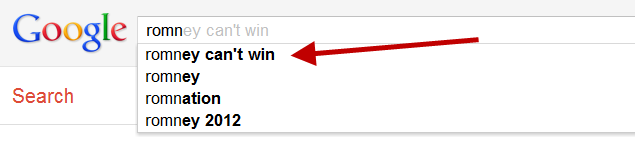
    US presidential candidate Republican Mitt Romney can’t seem to catch a break even from Google. Not only does it suggest that he can’t win, if you start typing in Romney’s name, but if you disagree, Google tries to correct you.

    Suggestion: Romney Can’t Win

    Start typing in Romney, and Google as its top suggestion “romney can’t win,” as you can see below:

    Did You Really Mean He Can Win?

    Romney believers who ignore the suggestion and go on to search for “romney can win” get this response:
    “Did you mean: romney can’t win” — that’s Google’s spell checking system kicking in.

    Don’t Blame Us, Blame The Algorithms!

    Slate appears to have spotted the funny correction first, and also notes that it doesn’t happen for any other Republican candidate; CBS News has exactly what you’d expect Google to say in response, that this is all down to automation:
    Our spellcheck feature is automated, and while no algorithm is perfect, we’re always working to improve our search quality.
    That’s true. But both the spelling correction and suggestion will come based on what actual people are doing.

    Search-Off Says: “Can’t” Beats “Can” 5:1

    The spelling correction system will look in part on what the most popular use of a word or phrase is across the web, to help spot errors. According to Google, pages with the exact phrase “romney can’t win” are beating those with the exact phrase “romney can win” by about 5 to 1:
    The screenshot above shows that for a search on the “can’t” phrase, there are currently 339,000 matches across the billions of web pages that Google has found. In contrast, there are only 65,700 web pages that use the “can” phrase.

    Is News Driving The Funny Suggestion?

    The suggestions themselves are based on what people are searching for. For “romney can’t win” to appear, Google should be seeing a substantial number of people searching for that topic.
    Interestingly, however, I can’t find that this term is popular enough to even register when using the Google Insights tool, which reports on the popularity of search topics at Google. When I tried searching for either phrase, no data was reported.
    I also tried a check using another Google tool, the AdWords Keyword Research Tool. In that case, it reported that “can” searches happened, on average over the past 12 months, 590 times per month versus “can’t” searches at 110 times per month:
    So if “can” searches beat “can’t” searches 5 to 1, why is Google’s suggestion tool — which is based on popular searches — suggesting the opposite?
    There’s a very slight chance that someone generated enough queries purposely to trigger that suggestion. It’s possible, and some anti-Romney force might be clever enough to do this.
    Much more likely, there’s been a recent upswing in searches for “romney can’t win” — most likely caused by attention to the spelling correction.
    That’s especially supported by the fact that Bing doesn’t offer a similar suggestion. That indicates not many people are searching for “romney can’t win” at Bing — and since it doesn’t have a funny correction as Google does, they really wouldn’t be doing many search for that there.