Saturday, 29 October 2011

Online Marketing Program: 2.1 SEO-Keyword Research


Time to turn to SEO and what it can do for your online marketing program – and for those of you who know this topic somewhat, I’m sure you’d agree, that SEO can do wonders..so let’s begin with Keyword Research!
First, you will need to attempt to define your Keyword phrases for your products or services; discover your competitor’s usage of their own keywords; develop a completely new set of keyword candidates for your own use and then re subscribe to the top 10 search engines.
One must develop your original set of keyword phrases for broad and exact keywords chosen and they will all have to be “phrased” for your use, before one can actually begin to test them as they are and that newly phrased keyword list will become the benchmark for your keyword positioning strategy.
You will also have to first, check that all keyword terms are being used properly and that each term exists, or will have to be re-phrased and that any ‘extra’ terms be listed but only as ‘alternates’ to your original list.
Here’s a quick look at the basics in an Infographic that I use to try to explain how to formulate a keyword research plan….
From SEOmoz…they rationalize the process as follows….
Ask yourself…
Is the keyword relevant to the content your website offers? Will searchers who find your site through this term find the likely answer to their implied question(s)? And will this traffic result in financial rewards (or other organizational goals) directly or indirectly? If the answer to all of these questions is a clear “Yes!” then proceed…
Search for the term/phrase in the major engines…
Are there search advertisements running along the top and right-hand side of the organic results? Typically, many search ads means a high value keyword, and multiple search ads above the organic results often means a highly lucrative and directly conversion-prone keyword.
Buy a sample campaign…
For the keyword at Google AdWords and/or Bing Adcenter and then for example in Google Adwords, choose “exact match” and point the traffic to the most relevant page on your website. Measure the traffic to your site, and track impressions and conversion rate over the course of at least 2-300 clicks (this may take only a day or two with highly trafficked terms, or several weeks with keywords in lesser demand).
Using the data you’ve collected…
Make an educated guess about the value of a single visitor to your site with the given search term or phrase. For example, if, in the past 24 hours, your search ad has generated 5,000 impressions, of which 100 visitors have come to your site and 3 have converted for total profit (not revenue!) of $300, then a single visitor for that keyword is worth approx. $3 to your business. Those 5,000 impressions in 24 hours could probably generate a click-through rate of between 30-40% with a #1 ranking which would mean 1500-2000 visits per day, at $3 each, or ~$1.75 million dollars per year. No wonder businesses love search marketing!

Daily Search Forum Recap: October 28, 2011


Here is a recap of what happened in the search forums today, through the eyes of theSearch Engine Roundtable and other search forums on the web.
Search Engine Roundtable Stories:

What Would Google Be Without SEOs?

It was then that Google announced it was “making search more secure” by encrypting searches that originate from users who are logged in to Google Accounts. In practical terms, this means that Google will no longer pass organic search keyword query details on to website analytics tools when users are still logged in to Gmail, Google Docs, Google+, or any other Google service. This change is cited as an attempt to protect the “privacy and security” of its users’ Web search history. According to Google, this impact affects less than 10% of all search queries.
 
For SEOs, it means we’re now flying blind for a portion of our search-referred traffic.
 
This announcement has spawned a lot of discussion among SEOs, much of it negative and directed towards Google itself. Many aren’t buying the search engine's explanation for the change.  An example of the venom directed toward Google can be seen in Dutch SEO Joost de Valk's inflammatory response, “Google Whores Out Users with False Privacy Claims.”
 
Overall, the biggest gripe is that this change is occurring for natural search alone; paid search keyword data will continue to be available to PPC marketers. That is because PPC marketers “rely on that data to optimize search campaigns.” Conspiracy theorists suspect that “PPC marketers needing data to optimize campaigns” is little more than code for “AdWords is our lifeblood and we’re not about to add friction to that revenue stream.”
 
Then, in an interesting move, and what can only be characterized as a PR response to SEOs, Google officially announced that it doesn’t consider SEO to be spam. SEOs are our friends. Let's all hug and make up.

This was interesting to me, because I wondered why Google would care about what SEOs thought. After all, it has a relative monopoly in search in most countries. Why would it put out a public "response" directed to the SEO community?

Or, more succinctly, why are SEOs important to Google?

I considered that question for a few days, and I think deep down Google understands that there's a certain synergism at play between its natural results and SEO. The two function in harmony with one another, and to the betterment of both parties. The truth is, Google needs SEOs.

Without SEOs, who help build compelling and credible content, and make that content easy to discover, Google would be:
 
1. Less relevant. To those of you who are rolling your eyes, hear me out. SEO is not (usually) a manipulation of search results. White-hat SEO is hard and time-consuming. It requires a real commitment to search engine and website users alike. Without engaging content, and SEOs to prop up that content, there's no guarantee that Google's results would be as fresh and relevant as they typically are.

2. Less profitable.  Without relevance across organic results, its AdWords paid search platform wouldn’t be nearly as lucrative for Google as it is. Lower results relevance to users would drive adoption for other search engines. The obvious beneficiary would be Bing, but how many other upstart engines would have thrived in an environment where Google's results were suspect?

3. Less powerful.  Google is an undeniable engine of innovation. Beyond search, many Google services and technologies have become staples of an online experience (Gmail, Google Docs, Chrome, Android). The profitability of its search business (as a result of its search relevance) has facilitated that innovation. If the relevance of its search algorithm begins to be questioned, the foundation of Google's empire will start to show cracks.

I'm not trying to sound overly grandiose with my views, nor am I delusional about the importance of SEO. I get it. 

My point is that Google needs to better appreciate the value it derives from the efforts of SEOs. We share a co-existence that should be viewed as very strategic to Google's business model. Making wholesale changes to how it treats the underlying data behind organic results, then issuing a weak "we like you guys" video, does not reflect a healthy partnership.

Saturday, 22 October 2011

Can Facebook Solve The Unemployment Problem?


Facebook Social Jobs Partnership
Earlier today, Facebook and the U.S. Labor department announced a new program to help unemployed workers find jobs. The program, which is called The Social Jobs Partnership, will seek to leverage the power of social media to connect unemployed workers with jobs.
Marne Levine, Facebook’s VP of Global Public Policy, released a statement that said the following of the new program:
“Facebook is about connecting people so that they can share what’s important to them, and that is the driving force behind the Social Jobs Partnership. We’ve brought employers, recruiters, college career services and government agencies together to help the millions of Americans who use Facebook find jobs.”
According to a recent independent survey, over 70% of college career centers have a Facebook Page and a recent poll indicated that 92% of employers have either recruited or plan to recruit via social networks in the near future.
The program will include a central Page on Facebook that will provide resources and content to help both employers and job seekers. In the states with the highest unemployment rates, Facebook will promote the resources and Page using public service announcements on Facebook.
In addition to the Page, Facebook and its partners are researching how social networks are currently being used by the unemployed, career centers, and employers. Facebook indicated it would like to deliver job postings virally to the unemployed workers through Facebook.
Facebook and the Department of Labor are working closely with the Direct Employers Association, National Association of Colleges and Employers, and the National Association of State Workforce Agencies to leverage the power of social media to match potential employers with unemployed workers. Although the jobless claims slightly decreased last week, the unemployment rate has been above 9% since April.

Gmail Update: Details About the New Product Update


gmail update look and features
Yesterday, Gmail, which has over 260 million people using the free email service worldwide, accidentally released a video that details upcoming product changes. Although the original YouTube video is no longer viewable, a copy of the video has been uploaded.  Jason Cornwell, a user experience designer for Google, says the following in the video:
“We’ve been hard at work to update Gmail with a new look. We’ve completely redesigned the look and feel of Gmail to make it as clean, simple and intuitive as possible.”
The video revealed that the new features include: high definition themes, automatic resizing based on browser size, revamped email thread display, redesigned conversations, and advanced search features.
The video showed a selection of “high-definition themes,” which will allow users to customize the appearance of Gmail using high definition imagery. In addition to choosing one of the default themes, several experts are speculating that users will be able to upload their own photos to further customize the Gmail experience.
In addition to the new themes, Gmail will automatically adjust its size to fit within a browser window and has four display densities that users can choose from.

The new version of the conversation view, which looks quite similar to Facebook Messages, displays profile photos of each person in the conversation and will be easier to read.
Currently, users have to manually type out advanced search operators or click the “show search options” link to use the advanced search feature. After the update, a user will automatically see the targeted search features every time they click “search”; in addition, users can also easily create new search filters.
When Mashable contacted Google regarding the leaked video, Andrea Freund, a Gmail representative told them:
“Oops, you weren’t supposed to see that. Stay tuned, we’ll be sharing more info on Gmail’s new look soon.”
In addition to revamping Gmail, Google is also rolling out new user interfaces for Google Calendar and Google Docs that focuses on usability and removing clutter. The Gmail product update is expected to be rolled out in the next several weeks.

7 Quick Ways to Turn Your LinkedIn Profile into a Social Media Marketing Workhorse


In my opinion, the most powerful social media profile you can use is the LinkedIn profile.
image of linkedin icon
Most powerful that is, if you are looking to do more business and/or achieve your professional goals.
There’s a certain mindset LinkedIn members have when they spend time there.
They don’t browse through pictures and videos of their friends.
They don’t go there to share 140 characters of their current status.
And they don’t go there to watch panda bears sneeze or talking dogs say “I love you”.
Although other social networking sites have their place and purpose, none of them have the professionally directed power of LinkedIn.

LinkedIn means business!

Your LinkedIn profile says everything about who you are professionally.
And since it tends to rank well on Google for your name, people will read your LinkedIn profile when they want to do research on you, your product, service, or company.
In other words, what you say on your profile will have an impact on the amount of business you do on LinkedIn.
Here are 7 ways to enhance the copy on your profile to ensure that you get everything you want from LinkedIn:

1. It’s all about the headline

Headlines are everything in newspapers, magazines, and on blogs.
They are just as important on your LinkedIn profile, because the headline the first thing that shows up anytime someone does a search online. A simple way to ensure your headline doesn’t suck is to follow a simple formula.
Tell people specifically:
  • Who you are
  • Who you help, and
  • How you help them
Tell them in the fewest words possible. Make your headline compelling and you’ll increase your chances of more meaningful profile views.

2. Get personal

Although LinkedIn is the “professional” social networking site, you want to reserve the first part of your “Summary” to add a personal note about yourself.
People don’t want to look at a resume with bullet points of past sales achievements (barf!), they want to know a little bit about your background. They want to know who you are.
To achieve this, add a personal intro about your goals, what you’re passionate about, and what you love to do in life.
This small touch of transparency will help you connect on a personal level with anyone who views your profile.

3. Spell check. And then check again.

You probably have no clue how many deals are happening day in and day out on LinkedIn.
I hear success stories all of the time about people landing their dream job, getting hired for a major consulting deal, finding 7 figure investors, receiving major sponsorships, selling out tickets to live events, and more.
The potential for what you can accomplish on LinkedIn is nearly unlimited.
However, I also hear about people who are completely turned off by a prospect with a bare-bones profile, or worse — spelling mistakes. Make sure to spell check everything and have others review it to give you their feedback.
This small step could make all the difference in your interactions on LinkedIn. You know what they say about those first impressions.

4. Make a call to action

One of the biggest mistakes you can make is not having a call to action on your LinkedIn profile.
If you spend all of this time crafting a great message but don’t lead the viewer anywhere, all your work will have been for nothing.
In your “Summary”, or in your LinkedIn welcome video make sure to tell people what site they should go to for more information, what number to call to get a free consultation, or the best way to email you.
Don’t leave your potential customers and clients hanging. Give them a place to go next (and a reason to go there).

5. Social proof is powerful proof

Social proof helps influence others into making a “buying” decision.
LinkedIn makes this step easy by providing 3 primary sections to add social proof:
  • Education. Adding the college or university you attended provides your education credentials, and increases the value of your personal brand.
  • Awards. This section is the one place you can brag about yourself a little. Include any past accomplishments or industry awards you can think of that will increase the value of your profile.
  • Recommendations. The more recommendations you have on your profile the better. This is the best form of social proof, as it conveys credibility and authority. The best way to receive recommendations is to give them first.

6. Improve your search rankings

If you want to get more leads and sales, then the easiest thing you can do is become easily found on LinkedIn for keywords in your niche.
Think about what people would be searching for on Google to find your business, service, or product (for example, mine would be “sports” or “LinkedIn Tips”). Make sure you add your keywords throughout your LinkedIn profile in five main places.
Learn more about where to include your keywords and increase your LinkedIn SEO here.

7. Stand out from the crowd

With close to 130 million LinkedIn profiles, many of them look the same.
Don’t join the herd of boring “glamour shot” profiles. Instead, do something creative in your copy to market yourself on LinkedIn, stand out, and keep people coming back for more.
Add LinkedIn’s blog application, sync it with your twitter updates, or include other advanced applications to help your profile stand out from the rest.

Take your profile to the next level

As LinkedIn continues to grow in numbers and gain more media attention, it will prove to add more value to your brand and business.
If you want to get the most out of your efforts with LinkedIn, take the time right now to implement these 7 steps and watch your profile take off.

Google's Quality Rating Guidelines Leaked, Again

This version is labelled version 3.18 and dated March 30, 2011. Since before this document, the earliest version I had was from back in April of 2007.
Download Google's Quality Rating Guidelines
You can download the 2+ MB PDF file, which is 125 pages filled with Google insider nuggets by clicking here (It has been removed) but you can read the summary of the document at PotPieGirl. . The PDF is from Pot Pie Girl's blog post.
Most of the document goes through how these Google quality raters should use the quality scoring system. But it also spends a tremendous amount of time explaining how to classify pages and images and documents. This information can be very useful for SEOs in understanding what Google thinks quality versus non quality pages are, spam vs non spam and so on.

SEO Link Building Job Interview Question


A HighRankings Forum thread has a person going on a job interview set with the task to come up with ideas on how to get "natural links" for a site in a specific niche.
The SEO job applicant said he is new to the space, only got the interview because of his/her "enthusiasm." Outside of that, the applicant needs to prepare for the task of a session of "brain storming" on "ideas about natural link building." The specific niche is a "motorcyclist company selling equipment, parts and clothes need to build natural links and i need to put suggestions forward."
The question is, is the SEO company asking a trick question? How do you naturally build links? Isn't that, by definition, unnatural?
In any event, the folks at HighRankings forums gave the applicant some advice.
The job interview is probably over by the time this story goes live but it does make for an interesting topic.

66% Says Google's Panda Minor Update Was Very Significant

There were just too many complaints in the forums for it to appear to be really that "minor."
Google Panda Poll 2.5.2
So I decided to run a poll, where we have well over 400 responses. The responses were overwhelming against the notion that this was a minor update or tweak to the Panda algorithm. Almost 80% of those who responded said this was a "somewhat significant" or "very significant" update. Under 15% said this update was not significant, which is very low.
I am a bit surprised by these numbers. I was hoping what I saw in the forums was just a loud minority but it seems like a lot of people would classify this minor update as more major and more hurtful than maybe Google would have considered?

Want Better Google Analytics Data? Learn To Tag Your Campaigns!


One of the most important hurdles to tackle before analyzing data is collecting clean and correct data. There are many ways to make your data more accurate; tagging is one of them.
Although the correct tagging of your campaigns seems something basic, I still see a lot of companies and websites that aren’t tagging at all or do it in a wrong way. In this article, I will explain the major tagging issues and how to tag correctly.

Campaign Tagging Problems

The most important issue with tagging your campaigns is the involvement of many different colleagues and partners.
With the implementation of a Google Analytics code or the configuration of goals, you are most of the time depending on 1-2 people.
With the tagging of your campaigns, often multiple people are involved because the search marketer, affiliate marketer, email marketer, display marketer, social marketer, external banner and display partners, etc. all have to tag their campaigns. More people involved means a bigger chance on errors. Even if all of your colleagues  are tagging, it is unlikely that they all use the same notation.
For example, email marketing can be described as e-mail, email, Email, E-mail or mail. If not everyone is using the same notation, Google Analytics will report multiple notations for the medium email marketing. This makes a correct way of analyzing the data more difficult.
The use of capitals can be solved by configuring lower case filters on the different parameters. These parameters will make sure that the mediums email and Email will return in Google Analytics as email.
More on the use of lower case filters can be found here:http://www.google.com/support/analytics/bin/answer.py?answer=55593.
To solve the different notations of the word email, a tagging plan is required (although this could also be done by the search and replace filter, I would recommend using a clear tagging plan).

Create A Tagging Plan

Most of the people that read Search Engine Land understand what campaign tagging is and why it is important, however, some people that have to use campaign tagging don’t. This is exactly why it is necessary to start with an explanation of what campaign tagging is and why it is important.
The next step is to identify all colleagues involved in the campaign tagging process and to make a clear structure of how to tag campaigns.
Before starting with an example, it is important to know that there are 5 campaign tracking parameters of which there are 3 required (utm_medium, utm_source and utm_campaign):
    • utm_medium:  identifies the channel of a campaign (f.e. email, affiliate, display)
    • utm_source: identifies the source within a channel (f.e. name of an affiliate network)
    • utm_campaign: identifies a campaign within one or more sources / channels (f.e. Newsletter April)
    • utm_content: extra parameter for some extra information regarding content (f.e. banner1, textlink2, bottom link)
    • utm_term: is specific for non-Adwords paid search and gives you the possibility to identify the keyword
In the following example, the traffic comes from email marketing, affiliate marketing, display marketing, social media and external partnerships. I will only use the required parameters, but for even deeper analysis you could also make use of the other parameter(s).

Email marketing

For email marketing, you might use the following tag for your email marketing campaigns:
?utm_source=newsletter&utm_medium=email&utm_campaign=newsletter_week20
Within Google Analytics, you can then find the collected data for this under All Traffic Source as “newsletter / email”.
Normally the Email Marketing Software that you use can place the tag that you want automatically after all URL’s that you use for your email marketing campaigns.
Variable parameters
  • utm_campaign is variable
For each newsletter that you send, change the week or month number, so you can identify which newsletter it is. When you analyze the data, click to Campaigns and you can see the results of the different newsletters.

Affiliate Marketing

For affiliate marketing, use the following tag:
?utm_source=commisstion-junction&utm_medium=affiliate&utm_campaign={affiliateID}
Within Google Analytics, you can then find the collected data under All Traffic Source as “commission-junction / affiliate”
Normally, the Affiliate Network you work with can place the tag you want automatically after all Affiliate URL’s. They also can make sure the affiliateID is tagged.
Variable parameters
  • utm_source is variable – fill in the name of the Affiliate network you work with.
  • utm_campaign is variable – this will be the affiliateID.
Some examples:
  • utm_source=commission-junction
  • utm_source=clickbank

Partnerships

For partnerships, you might use the following tag:
?utm_source=startpagina&utm_medium=partnerships&utm_campaign=springsale
Within Google Analytics, you can then find the collected data under All Traffic Source as “startpagina / partnerships”.
If you make special deals with a company to promote your product, you of course want to know the results of your investments. You can tag these partners and analyze the results.
Variable parameters: 
  • utm_source is variable. Fill in the name of the partner you work with.
  • utm_campaign is variable. Fill in a specific product promotion or strategic campaign.

Display Marketing

For Display Marketing, you might use the following tag:
?utm_source=sanoma&utm_medium=display&utm_campaign=springsale
This way in Google Analytics, you can then find the collected data under All Traffic Source as “sanoma / display”.
If you make a deal with a Display Network to promote your product, you of course want to know the result of your investment. You can tag these Display Networks and analyze the results.
Variable parameters
  • utm_source is variable. Fill in the name of the Display Network you work with.
  • utm_campaign is variable. Fill in a specific product promotion or strategic campaign.

Social Media

For Social Media, you might use the following tag:
?utm_source=twitter&utm_medium=social&utm_campaign=tweetoffercanada
Within Google Analytics, you can then find the collected data All Traffic Source as follows “twitter / social”.
You can track the tweets you send out by adding a tag like above to your URL’s on Twitter. It is also possible for other social media such as Facebook.
Variable parameters
  • utm_source is variable. Fill in the name of the Social Network.
  • utm_campaign is variable. Fill in the name of the tweet.
Please note that this is just a guideline and that you may have to adjust it to get the best results for your marketing campaigns.
When you have finished the tagging plan, send and explain it to everyone involved and keep checking the data. Don’t forget to mention the Google URL Builder for an easy way to create the URL’s.

Google News Moves Advanced Options To Search Bar; A Sign Of Things To Come?


In what may be a sign of things to come across other Google properties, the advanced search search options in Google News have been moved away from their own page and placed right inside the main search bar.
Here are before and after screenshots to show what I’m talking about.
Before:
google-news-old
After:
google-news-new
There’s a small triangle on the far right of the search bar and, when your mouse moves over it, that “Advanced news search” indicator appears. When you click on the triangle, a full set of advanced search options appears — no need to click through to a separate page.
google-news-new-advanced
As far as I know, the actual advanced search options in that dropdown are no different than what used to be on the separate page (but it’s not like I memorized them, sorry).
Google Docs already has a similar feature, where a small triangle on the right of the search box brings up advanced search options. The upcoming Gmail redesign will also have (advanced) search options that are accessible this same way.
Other properties, like Google Image Search, Google Calendar and Google.com web search continue to have advanced search options on a separate page. But it’s not a stretch to imagine similar functionality rolling out across all Google properties, especially considering their summer announcement of plans to update the overall Google user experience with a “consistent visual experience.”

Google Puts A Price On Privacy


Earlier this week, Google made a significant changepurportedly to better protect the search privacy of users. In reality, it specifically — and deliberately — left a gaping hole open to benefit its bottom line. If you pay-to-play, Google will share its search data with you.
Google’s a big company that goes after revenue in a variety of ways some critics feel put users second. However, I’m struggling to think of other examples where Google has acted in such a crass, it’s all-about-the-revenue manner as it has this week. The best comparison I can think of is when Google decided to allow Chinese censorship. Yes, this is in the same league.
It’s in that league because Google is a company that prides itself by doing right by the user. Yet in this case, it seems perfectly happy to sell out privacy, if you’re an advertiser. That’s assuming you believe that Caller ID-like information that’s being blocked (except for advertisers) is a privacy issue.
Google doesn’t, as best I can tell. Instead, the blocking is a pesky side effect to a real privacy enhancement Google made, a side effect Google doesn’t seem to want to cure for anyone but advertisers.
If it had taken a more thoughtful approach, ironically, Google could have pushed many sites across the web to become more secure themselves. It missed that opportunity.
I’ll cover all of this below, in detail. It’s a long article. If you prefer a short summary, skip to the last two sections, “Why Not Get Everyone To Be Secure” and “Moving Forward.”

Default Encrypted Search Begins

Let’s talk particulars. On Tuesday, Google announced that by default, it would encrypt the search sessions of anyone signed in to Google.com. This means that when someone searches, no one can see the results that Google is sending back to them.
That’s good. Just as you might want your Gmail account encrypted, so that no one can see what you’re emailing, so you also may want the search results that Google is communicated back to you to be kept private.
That’s especially so because those search results are getting more personalized and potentially could be hacked. The EFF, in its post about Google’s change, pointed to two papers (here and here) about this.

Encryption Can Break Caller ID

There’s a side effect to encryption that involves what are called “referrers.” When someone clicks on a link from one web site that leads to another, most browsers pass along referrer data, which is sort of like a Caller ID for the internet. The destination web site can see where the person came from.
When someone comes from an encrypted site, this referrer information isn’t passed on unless they are going to another encrypted site. That means when Google moved to encrypted search, it was blocking this Caller ID on its end for virtually all the sites that it lists, since most of them don’t run encrypted or “secure” servers themselves.
This is a crucial point. Encryption — providing a secure web site — doesn’t block referrers if someone goes from one secure web site to another. Consider it like this:
  • Unsecure >>> passes referrer to >>> Unsecure
  • Secure >>> passes referrer to >>> Secure
  • Secure /// does NOT pass referrer to /// Unsecure

Google’s Referrer Problem

If everyone on the web ran secure servers, aside from the web being a more secure place in the way that Google itself wants it to be, the referrer hypocrisy that Google committed this week wouldn’t be an issue.
The vast majority of sites don’t run secure servers, of course. Tha posed a problem for Google. Referrers from search engines are unique. Since as long as we’ve had search engines — over 15 years — those links people click on from search engine results have contained the search terms people have used.
For publishers, this has made search marketing incredibly powerful. They are able to tell exactly what terms were used when someone found their web site, at a search engine like Yahoo, Bing or Google
Moving to secure searching meant that Google was suddenly, dramatically, no longer going to send this information to publishers, because as I’ve covered, virtually none of those publishers were running secure servers. As a result, Google almost certain realized there was going to be backlash.

Putting A Price On Privacy

Google could have endured the backlash, saying that if publishers still wanted this data, they could move to secure servers. Instead, it deliberately chose to override how referrers are passed, so that they would continue to be provided to just its advertisers.
Backlash, Google would endure, but it seems apparently not from those who made Google nearly $10 billion last quarter alone.
To solve this, Google changed from the standard way that referrers are supposed to be passed to its own unique system, which works like this:
  • Secure /// does NOT pass referrer to /// Unsecure unless…
  • Secure >>> passes referrer if ADVERTISER to >>> Unsecure
Let me be very clear. Google has designed things so that Caller ID still works for its advertisers, but not anyone else, even though the standard for secure services isn’t supposed to allow this. It broke the standard, deliberately, to prevent advertiser backlash.

The PR Plan For Publisher Backlash: It’s A Tiny Loss!

Google still knew there would be backlash from another group of publishers, those who have received this Caller ID referrer data from Google’s “free” or “organic” or “editorial” or “SEO” listings. What was the solution for that problem?
Here, Google seems to have a three-fold approach. First, suggest that only a tiny amount of data is being withheld. Some scoffed at Google’s estimate that I reported, that this would impact less than 10% of query data. But so far that seems to be holding true.
For example, here was our second most popular keyword sending us traffic from Google yesterday, according to Google Analytics:
“Not Provided” is what Google reports in cases when it now blocks referrers — or technically, it still provides referrers but is specifically stripping search terms out of them.
Our number two keyword! And yet, we received nearly 15,000 keyword-related visits from Google yesterday. These terms that were withheld amounted to only 2.6% of them.
On my personal blog, this is in about the 2% range. SEOmoz reported around 2%, as well.
These low figures will makes it easier for Google to gloss over publisher concerns, especially when they’re almost all being voiced by those in the SEO industry. The industry has a bad name, so if it’s against something, that can almost seem like a ringing endorsement for good.
Ars Technica had some comments like this, in response to its story on the Google change:
I’m playing the saddest song in the world on the smallest violin in the world. Poor, poor, SEO leaches
I AM completely unsympathetic. The sooner these SEO leeches, parasites, spammers and scammers die die die the better off the web will be.
Don’t make this mistake. This is not just an SEO issue. This is a user privacy issue. SEOs are simply the harbingers spotting Google’s hypocrisy around privacy.

The Data’s Still Around!

The second bit of PR messaging was to reassure that plenty of search data can be found in another way through the Google Webmaster Central service.
This is true. Google does provide search query data through this service, and it’s warmly welcomed by many site owners.
However, Google also provides search query data to its advertisers through the AdWords system. That’s the publisher equivalent to Google Webmaster Central.
Since advertisers can get data through AdWords, just as publishers can use Google Webmaster Central, why does Google still need to deliberately override how referrers would normally be blocked just for advertisers?
Google argued in its blog post that advertisers needed referrer data “to measure the effectiveness of their campaigns and to improve the ads and offers they present to you.” Outside of conversion tracking to the keyword level and retargeting, that doesn’t hold up, to me. I’ll get back to these.

Google Said Referrer Data Was Better

By the way, Google is on record as saying the data in Google Webmaster Central for publishers is not as good as referrer data.
This comes from an online exchange between Matt Cutts, the head of Google’s web spam team and who acts as a liaison on many publisher issues, and Gabriel Weinberg, the founder of tiny Duck Duck Go search engine who was challenging Google over providing referrer information.
Weinberg wrote:
So now that we know what is going on, why allow this personal information to leak? As far as I can tell, the only reason is so Webmasters can do better at Google SEO. And that reason can be wholly mitigated through the use of Google’s Webmaster Tools.
Cutts responded (and I’ll bold the key part):
Google’s webmaster tools only provide a sampling of the data. We used to provide info for only 100 queries. Now we provide it for more queries, but it’s still a sample.
Please don’t make the argument that the data in our webmaster console is equivalent to the data that websites can currently find in their server logs, because that’s not the case.
In January of this year, data from Google Webmaster Central was deemed inferior to referrer data. In October, it’s repositioned as an acceptable alternative to blocking referrers.

Referrers Are Private!

Google’s third and most important method of countering backlash is to make out that referrer data is somehow so private that it can no longer be provided to publishers. If you read closely, however, you understand that Google never actually takes this position. Rather, it’s implied.
Google’s blog post on the change made no mention — none — that this move was done because referrers had private information that might leak out. It was only about protecting the search results themselves:
As search becomes an increasingly customized experience, we recognize the growing importance of protecting the personalized search results we deliver.
Remember those studies I mentioned? Those were all about search results, not about referrers.
Referrers only get mentioned in Google’s post as a heads-up to publishers that they’ll be lost, and not because they’re also private and need to be protected but rather — well, Google doesn’t explain why. The implication is that they just have to go.
As I’ve read stories in the broader press, I’ve seen the assumption that Google is blocking referrers because it considers them to be private. Heck, I came away from my initial interview with Google when the news broke thinking the same thing.
It’s no wonder. Because Google has deliberately broken security to pass referrers to advertisers but not publishers, it had to lump that qualification into the overall security story. It made referrer blocking seem like it was done to protect privacy, rather than the troublesome side effect it really was.

But You Didn’t Say They Were Private Before

To emphasize how not-private Google has viewed referrer data, consider two issues.
The first was in 2009, when Google made a change to its search results that broke referrers from being passed. Publishers were upset, and Google restored referrers.
Cutts — who keep in mind is one of the people Google had talk about this week’s encryption change –  tweeted “yay” about the restoration. Clearly, he didn’t see any privacy issues being lost by it then. He was happy Google went out of its way to bring referrers back.
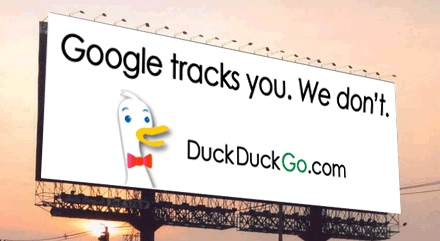
Think 2009 is too far back? OK, at the beginning of this year, Duck Duck Go — aside from buying a billboard to attack Google on privacy grounds – launched an illustrated guide to alleged Google privacy issues, including concerns over referrrer data.
In reaction to that, Cutts pushed back on referrers being a problem:
Referrers are a part of the way the web has worked since before Google existed. They’re a browser-level feature more than something related to specific websites.
When he was further challenged on the issue by Duck Duck Go’s founder Weinberg, Cutts specifically did not include referrers in a list of things that seemed to be private:
That was the same day we announced SSL search, which prevents referrers to http sites….
The fact is that Google has a good history of supporting privacy, from fighting overly broad subpoenas from the DOJ to SSL Search to creating a browser plugin to opt out of personalized advertising.
On a personal note here, I like Matt Cutts. I’m not trying to single him out unfairly by citing this stuff. He’s just a Googler extremely close to the issue, knowledgable about it and even when speaking in a semi-official manner, it reflects back on what’s true with Google.
Personally, I get the impression he might not agree with the referrer blocking for publishers but is going to put the best spin he can on a decision that his company made. Just my gut feel, and no special knowledge here. I could be wrong. Maybe I can get him to share more later.

Google Change Benefits Google

I think it’s fair to say that Google has not agreed with the view that referrers are private, nor has it clearly said referrers were blocked to protect privacy.
So why do it? One reason is that it makes Google more competitive. If someone lands on your web site, and you know the search term they used, you can then target them in various ways across the web with ads you believe reflect that search interest. All you need is the initial term.
This is called “retargeting,” and Google’s a leading provider of retargeted ads. When you cut the referrers out, except for your own advertisers, Google makes it harder for its competitors to offer retargeting services. Search marketers already understand this. Wait until Google’s anti-trust enemies clue in. They’ll be swooping in on this one (and we’ll have more to say on it in the future).
Another benefit is that it prevents anyone but Google’s own advertisers from doing keyword-level conversion tracking. With search referrers, you can determine what someone who searched for a particular term later did on your site. What further pages did they go to? Did they purchase a product or service? Without the search terms, you can’t do this degree of analysis.
That is, of course, unless you buy an ad. Conversion tracking at the keyword level turns into another sales feature for Google.

Didn’t Think Or Don’t Care?

I think the biggest reason Google hasn’t fixed the broken referrer problem is either that it just didn’t care about publishers or didn’t really think through the issues more.
Either is bad. The latter has some weight. Consider the last time that Google broke referrers, Cutts explained that the impact just hadn’t been considered:
[Cutts] says the team didn’t think about the referrer aspect. So they stopped. They’ve paused it until they can find out how to keep the referrers.
Surely someone had to have thought about the impact this time? Someone decided that it was a good idea to keep passing referrer information to advertisers. Someone decided that for whatever reason — and it wasn’t privacy — that publishers couldn’t keep getting this information. But what that reason is remains unclear.

Why Not Get Everyone To Be Secure?

What I do know is that Google missed a huge opportunity to make the entire web much more secure. Google could have declared that it was shifting its default search for everyone  – not just logged-in users — to be secure. Privacy advocates would have loved this even more than the current change which, using Google’s own figures, protect less than 10% of Google.com searchers.
Google could have also said that if anyone wanted to continue receiving referrer data, they needed to shift to running secure servers themselves. Remember, referrers pass from secure server to secure server.
Millions of sites quickly adopted Google +1 buttons in the hopes they might get more traffic from Google. Those same millions would have shifted — and quickly — over to secure servers in order to continue receiving referrer data.
Better protection across the web for everyone, while maintaining the unwritten contract between search engines and the publishers that support them to provide referrer data. That would have been a good solution. Instead, we got Google providing protection for a sliver of those searching, withholding data from the majority of sites that support it and solving problems only for its advertisers.

Moving Forward

I’m expecting to talk further to Google about these issues, which I raised with the company right after writing my initial story. I’m still waiting for them to find anyone appropriate higher up in the company to respond. Fingers-crossed. The best I could get so far was this statement:
We’ve tried to strike a balance here — improving privacy for signed in users while also continuing to provide substantial query data to webmasters.
To conclude, I think the move to secure searching is great. I’d like to see more of it.
As for referrers, there are some who do believe that they are private. Chris Soghoian is a leading advocate about this, and I’d recommend anyone who wants to understand more to read the blog post he wrote about an FTC complaint he filed over the issue. Read the complaint, too. Also see Duck Duck Go’s DontTrack.us site.
In terms of Google blocking referrers, it already blocks tons of stuff it considers private from its search suggestions. Conceivably, it could use the same technology to filter search referrers, to help publishers and protect users.
But aside from that, if Google thinks this needs to be done for privacy reasons, then it needs to block referrers for everyone and not still allow them to work for advertisers. That move is one of the most disturbing, hypocritical things I’ve ever seen Google do. It also needs to take the further step and stop its own Chrome browser from passing them.
If blocking referrers isn’t a privacy issue, then Google needs provider referrer data to all publishers, not just those who advertise.